
Overview
The User Overview Report provides an individual view of hand hygiene performance and wearable activity in the Vitalacy Web Application.
Use this report to review your compliance, hand hygiene activity, wearable usage, and performance trends over time.
User Overview
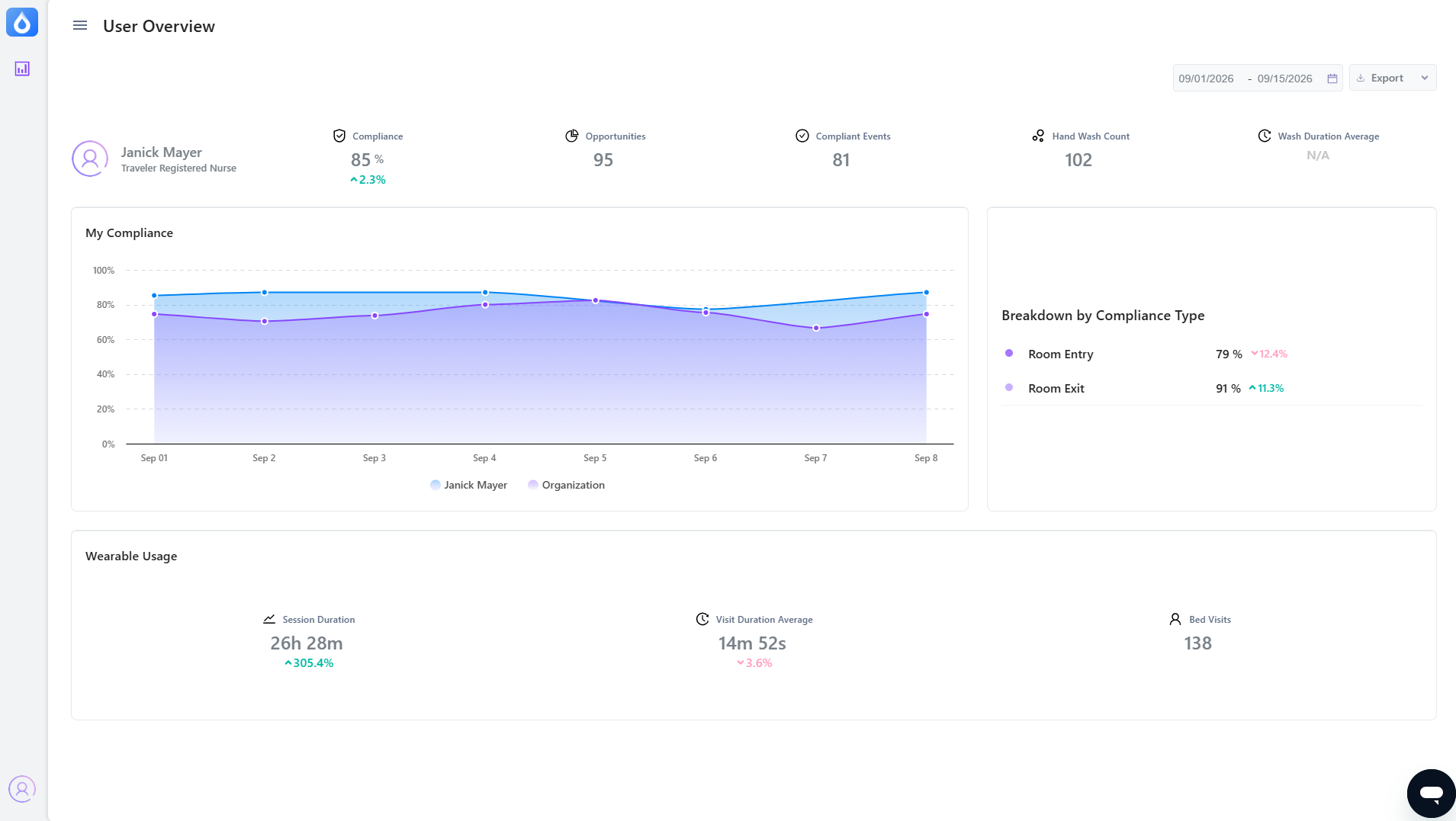
At the top of the report, the User Overview section provides a high-level summary of your performance.
The following information is displayed:
User Information: Displays your name and profession on the left side of the overview.
Compliance: Displays your overall hand hygiene compliance for the selected reporting period.
Pro Tip: The percentage change beneath your compliance score shows how your compliance changed compared with the report’s applicable comparison period.
Opportunities: Displays the total number of hand hygiene opportunities recorded for you during the reporting period.
Compliant Events: Displays the number of recorded hand hygiene opportunities in which you met the compliance requirements.
Hand Wash Count: Displays the total number of hand hygiene events recorded for you.
Wash Duration Average: Displays the average duration of your hand hygiene events.
Important Note: Wash Duration Average is unavailable for SmartBadge users and will display N/A.
My Compliance
The My Compliance section provides a visual representation of your compliance over time.
The line chart displays your compliance percentage across the reporting period, allowing you to identify trends and changes in your performance.
The chart includes:
- Date: The horizontal axis represents the dates within the reporting period.
- Compliance Percentage: The vertical axis represents your compliance percentage.
- Your Compliance: The line labeled with your name displays your compliance.
- Organization: The organization line displays your organization’s compliance for comparison.
Using the Compliance Trend
Use the compliance chart to:
- Identify increases or decreases in your compliance.
- Review changes in your performance over time.
- Compare your performance with your organization’s performance.
Breakdown by Compliance Type
The Breakdown by Compliance Type section provides a more detailed look at your compliance based on the type of hand hygiene opportunity.
The report currently displays:
- Room Entry: Represents your compliance when entering a patient room.
Room Exit: Represents your compliance when exiting a patient room.
Viewing these percentages separately can help identify whether your hand hygiene workflows need to be reviewed.
Wearable Usage
The Wearable Usage section provides information about how you used your Vitalacy wearable during the reporting period.
This section includes three metrics:
Session Duration: Displays the total amount of time your wearable was active during the reporting period.
Visit Duration Average: Displays the average amount of time associated with your recorded patient visits.
Bed Visits: Displays the number of recorded visits to patient beds during the reporting period.
Exporting the Report
You can easily export this report:
The Export dropdown is located at the top right of this report.
Comments
0 comments
Please sign in to leave a comment.